Tech rider and stage plot: what they are and how to make them
The input list, the stage plot and what you ask of the venue: how to write a rider the engineer understands at first read.
 By Joan Subirats, founder of The Jazz Passport8 min read
In this article
The tech rider is the document where you tell a venue what you need to play: how many channels, which microphones, which instruments the venue provides, how many monitor mixes and how long a soundcheck. The stage plot is its drawing, showing who stands where. Sent together, they save phone calls, surprises and soundchecks done against the clock.
The person reading them is an engineer who doesn't know you and has never heard you. A good rider is one they understand on the first read.
What a tech rider contains
A clear rider fits on one or two pages. Its sections come in the order the reader needs them:
- The line-up. Who you are and what each person plays, in one line.
- The input list. Every signal that goes into the desk.
- The stage plot. Where each musician, amp and monitor goes.
- The backline. The instruments and amps the venue provides, and the ones you bring.
- Monitors. How many mixes, and who they are for.
- Power. How many sockets, and where.
- Timings. Load-in, soundcheck and the changeover between bands.
- A technical contact. Someone who can answer questions, with an email and a phone number.
Then add a date. If a rider has no date, nobody can tell whether it is still valid.
The input list
The input list numbers every sound source that goes into the desk. For each one it gives the microphone or connection you suggest and the stand it needs. The engineer reads it first, because it tells them how to set up the desk and the stage before you arrive.
Here is one for a quartet of voice, guitar, double bass and drums:
| Channel | Source | Mic or connection | Stand |
|---|---|---|---|
| 1 | Kick drum | Kick drum dynamic | Short boom |
| 2 | Snare | Dynamic | Short boom |
| 3 | Hi-hat | Small condenser | Short boom |
| 4 and 5 | Overheads | Pair of condensers | Tall boom |
| 6 | Double bass | DI box | None |
| 7 | Double bass | Clip-on mic | None |
| 8 | Guitar amp | Dynamic | Short boom |
| 9 | Lead vocal | Vocal dynamic | Tall boom |
| 10 | Guitar, speaking vocal | Vocal dynamic | Tall boom |
Three terms in the table may need explaining. A DI box (direct injection) turns the output of an instrument or an amp into a signal the desk can take without a microphone. Overheads are the mics hung above the kit to pick up the cymbals. A boom is the arm that extends from the stand.
The list usually starts with the drums and goes on through bass, harmony and voices, because most engineers lay out a desk in that order. If someone switches instruments mid-set, each instrument gets its own channel. If something is essential, such as a particular mic for your instrument, say so. If an equivalent will do, write "or similar".
The stage plot
A stage plot is a simple drawing of the stage as the audience sees it. It shows each musician in place, the amps, the monitors and the power points. It doesn't have to be pretty. It has to read at a glance and make clear which way round it is drawn.
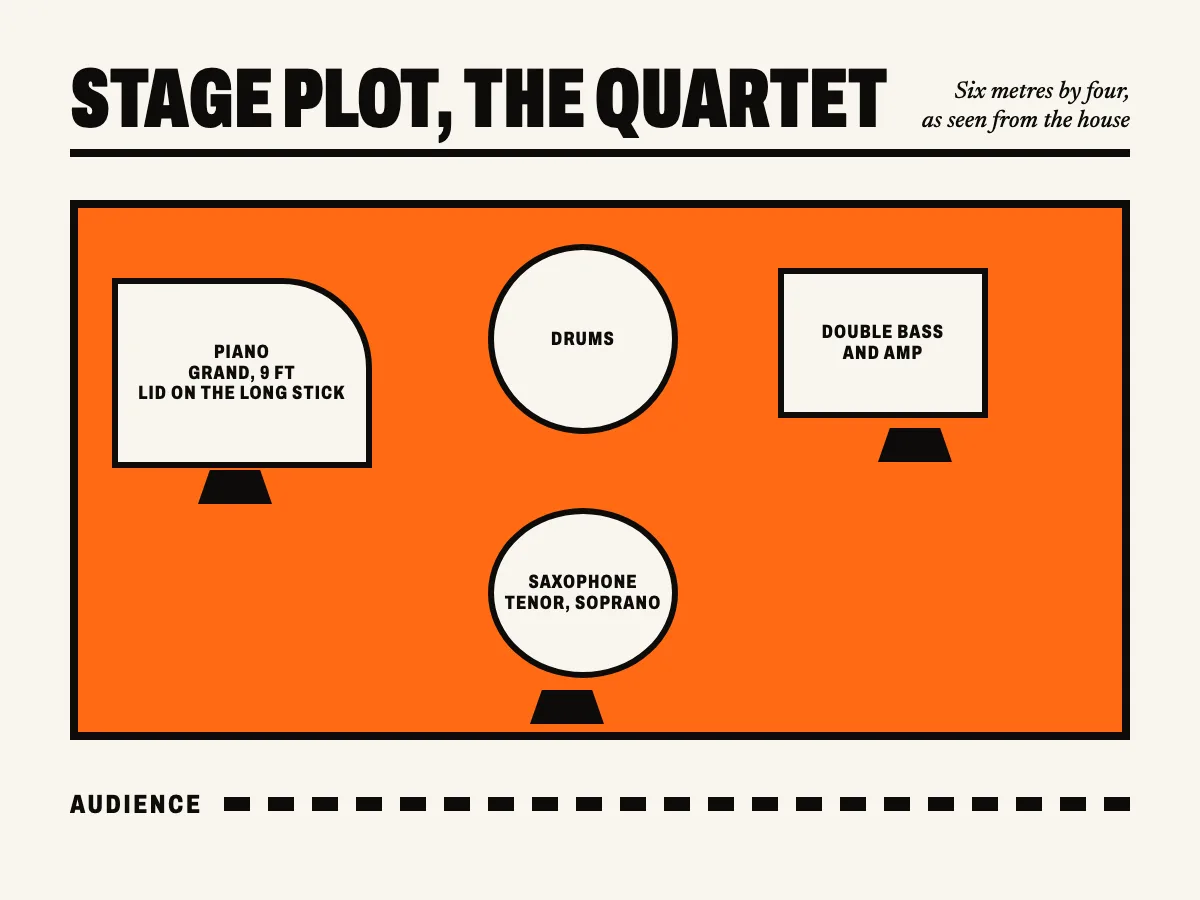
The quartet's plot gives the stage size at the top and the point of view ("as seen from the house"). Each player has a monitor drawn in front of them, and the audience is marked along the bottom. With that, the engineer knows where to run cables before the van arrives.
Backline, monitors and power
Backline is the stage gear the venue provides: piano, drum kit, amps. Say exactly what you need and what you are bringing. For a piano, give the kind and ask for it to be tuned on the day. For a drum kit, list the sizes of the kick, toms and snare, and say what the drummer brings. That is nearly always cymbals and sticks. For a double bass or bass guitar, name the amp and roughly how powerful it is.
Monitors. Say how many separate mixes you need and who shares which. If you use in-ear monitors, say so, because it changes how the desk is set up.
Power. Say how many sockets you need, where, and of what kind. If you are playing in another country, check the voltage and the plugs before you travel with your amps.
Timings: load-in and changeover
Say how long you need to set up and how long you need for the soundcheck, and whether the check has to happen in an empty room. At a festival with several bands in a row, the time that counts is the changeover: the gap between one band leaving the stage and the next one going on. If your setup takes a long time, say so early. At a festival, the running order and the soundchecks are planned around it.
Tech rider and hospitality rider
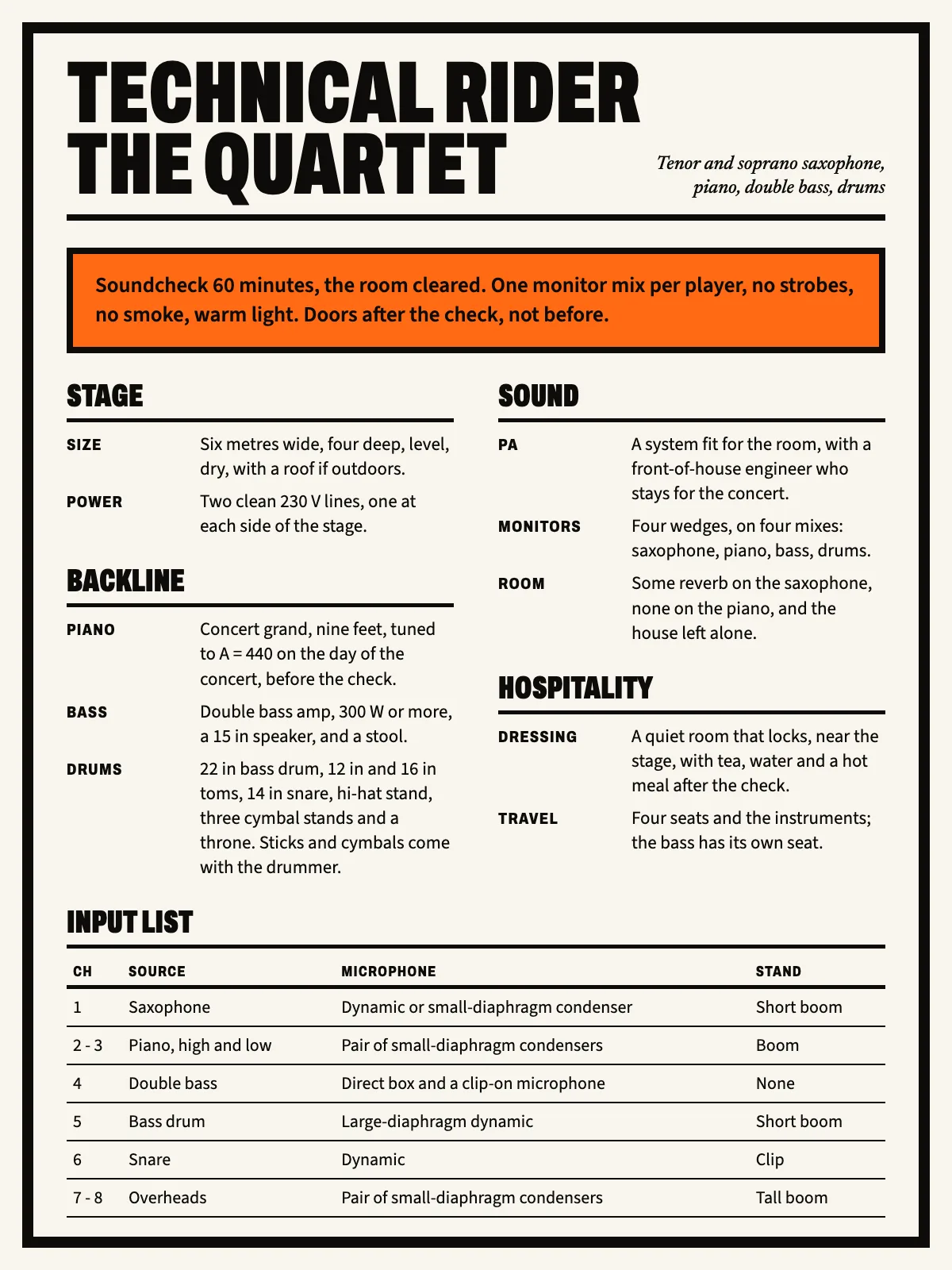
These are two different things. The tech rider covers sound, light and stage. The hospitality rider covers the dressing room, food, water, travel and accommodation. You can put both in one document with a section each, or on separate sheets. What matters is that the engineer can find the monitors without reading the menu. In the same way, production should be able to see how many people are travelling without reading the input list.
Sending it in good time
A rider is no use if it arrives on the day of the show. This order works:
- Once the date is confirmed, send the rider and the stage plot to whoever booked you, and ask for the venue engineer’s contact.
- Ask for the venue's tech spec: what gear it has, how big the stage is, and which piano or drum kit it offers.
- Compare the two and settle the differences in writing before you travel.
- A week before the show, confirm the load-in and soundcheck times with the engineer.
- Bring a printed copy of the rider on the day, just in case.
Put the date in the file name and in the document itself. If your line-up or your instruments change, update the rider the same day. Many soundcheck surprises start with an old rider still going round in old emails.
The rider and the stage plot are also part of the press kit. The other pieces are in how to make a press kit people read.
The rider in Pages
A rider has your schedule, your technical contact and everything you ask for, so it doesn't need to be public. In Pages you can put it on a private page of your site. A private page opens with its link or a password, and search engines never see it. On that page, a documents block links to the rider PDF and the stage plot, wherever you keep them. The demo site of the Coltrane theme has the two documents from this article, so you can see how they look.
Your site, without the website work. Ask for your invitation.
Pages is the site and the Studio for musicians by The Jazz Passport. The technical side is done; you bring the music.